 Oct 27, 2026
School ERP System: Key Modules and Implementation Steps School administrators juggle admissions, tim[...]

School administrators juggle admissions, timetables, fees, attendance and parent queries, often across separate tools. Data gets entered twice, reports take days to compile and parents wait for answers that should be instant. As enrolment grows, these gaps become harder to manage with spreadsheets and email.
This guide explains the modules that matter, how to plan implementation and which mistakes to avoid. It is written mainly for private schools, international schools and enrichment centres.
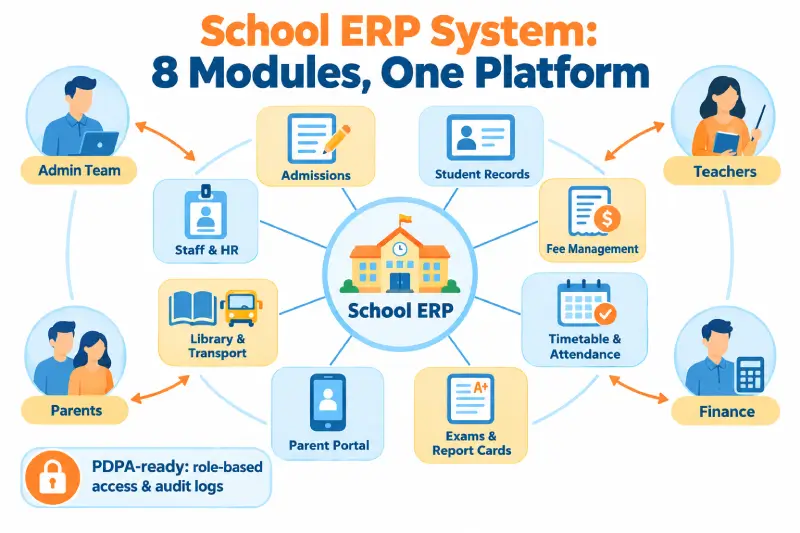
Enterprise resource planning (ERP) in education means one platform for academic and administrative work. A school ERP system connects admissions, student records, timetables, attendance, exams, fees, staff and communication. Each team works from the same data instead of separate spreadsheets. Leaders get accurate reports without chasing several departments.
In Singapore, government schools generally use systems provided centrally by the Ministry of Education. Standalone platforms therefore suit private schools, international schools, tuition centres and other private education institutions best.
Most institutions start looking for a new system after the same few problems repeat. Common signs include:
Vendors package their products in different ways. Most school ERP software is modular, so you can start with essentials and add features later. The ERP modules for schools below cover the needs of most institutions. Prioritise them based on your biggest daily pain points.
Online application forms capture student details, documents and payments in one flow. Admissions teams can track each applicant from first enquiry to confirmed enrolment. Accepted students then move straight into student records without re-entry.
Student records form the core of the platform. An ERP student information system holds personal details, guardians, medical notes, academic history and attendance in one profile. Authorised staff see only the information their role requires.
Fee collection involves invoices, reminders, discounts, refunds and reconciliation. ERP fee management automates invoicing by term or instalment, sends reminders and accepts online payments. Finance teams can match receipts against bank records without manual checking.
Private education institutions in Singapore use a standard student contract. Many must also protect course fees under the Fee Protection Scheme. A fee module that records contracts, payments and refunds clearly makes these obligations easier to evidence.
Timetable tools allocate teachers, rooms and classes while avoiding clashes. Attendance can be marked on tablets or phones, with automatic alerts to parents when a student is absent.
Teachers enter marks once, and the system calculates grades and produces report cards. Templates keep reports consistent across classes and terms.
Parent and student portals share timetables, results, fee statements and announcements. Mobile apps with notifications cut down phone calls and emails to the school office.
Larger schools often need extra modules for library loans, school bus routes and equipment. These modules track borrowed books, student pickup points and assets such as laptops or lab equipment. Add them once the core modules are running smoothly.
Staff records, leave, payroll and appraisals often sit in a linked module or separate HR software. Integration ensures teaching assignments match staff availability and approved leave.
Schools hold sensitive data about children and their families. The Personal Data Protection Act (PDPA) applies to private schools and other private sector organisations. Choose a platform with role-based access, audit logs, encryption and clear data hosting details. Notifiable data breaches must be reported to the PDPC within three calendar days of assessment.
A structured plan prevents disruption to teaching and fee collection. Successful ERP implementation for education depends as much on people as on software. Follow these steps:
Features look similar across vendors at first glance. Before committing to a school ERP system, compare vendors on support, flexibility and data handling. The checklist below covers the points that matter most:
Most rollout problems are predictable and avoidable. Watch for these:
The right platform cuts repetitive admin work and gives leaders accurate, timely data. Start with the modules that solve your biggest pain points, usually student records and fees. A well-planned school ERP system also gives parents faster answers and clearer fee statements. Plan the rollout around the academic calendar and invest properly in training. For a platform built around your fee rules, Awebstar can help you scope custom ERP software for your school.
Typical modules cover admissions, student records, timetables, attendance, exams, fees, communication and staff management. Most vendors let you start small and add modules later.
It depends on school size, data quality and the modules chosen. Planning around term breaks and launching in phases usually reduces disruption.
It can be, if the vendor offers encryption, role-based access, audit logs and regular backups. Confirm where data is hosted and how breaches are handled.
Yes. Most platforms integrate with payment gateways, so parents can pay online and download receipts. Payments then reconcile automatically against invoices.
An ERP runs administration such as admissions, fees and records. A learning management system delivers lessons, assignments and online learning content.
Oct 27, 2026
 Oct 27, 2026
 Oct 27, 2026
We'd love to hear from you! Send us a message or Call us, and we'll be happy to set up a time to understand your needs better.