 Oct 27, 2026
School ERP System: Key Modules and Implementation Steps School administrators juggle admissions, tim[...]

Month-end close should not depend on one laptop in the finance office. Yet many small businesses still run desktop accounting files that only one person can open at a time. Backups are manual, remote access is awkward and sharing data with an accountant means emailing files back and forth.
Moving your books online solves many of these problems but introduces new ones, such as data security and vendor dependence. This guide covers the benefits, the risks, Singapore compliance points and the steps for a clean setup.
Traditional accounting software runs on a local computer or office server. With cloud-based accounting, the software and data sit on the provider’s servers and open in a browser or app. The provider handles updates, backups and infrastructure. You pay a subscription rather than buying a licence upfront.
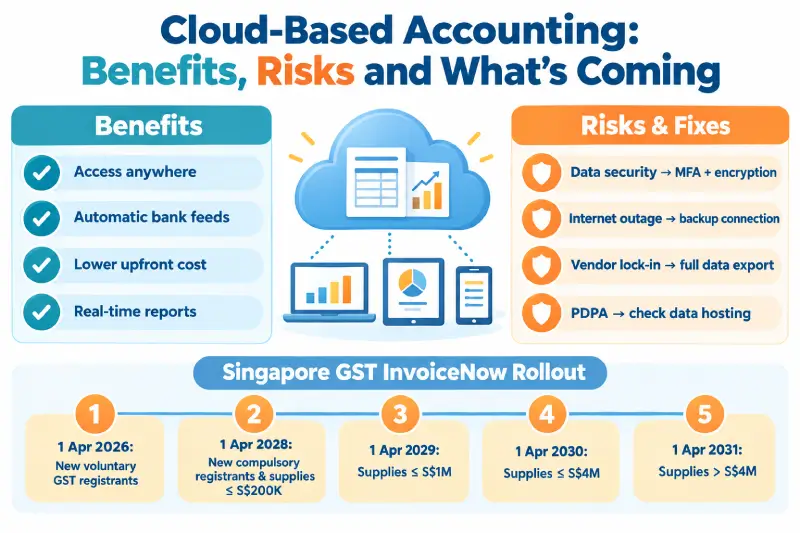
Owners, finance staff and external accountants can work in the same ledger at the same time. This removes version conflicts and speeds up month-end close.
Most platforms connect to business bank accounts and import transactions daily. Matching rules then suggest reconciliations, which cuts hours of manual work each month.
There is no server to buy, secure or maintain. Subscription pricing spreads costs evenly and scales with users or features.
Dashboards show cash position, receivables and profit as transactions are recorded. Decision-makers no longer wait for month-end reports to spot problems.
Providers update tax rates and reporting formats centrally for all users. This matters in Singapore as e-invoicing rules expand over the next few years.
Every benefit comes with a trade-off. The risks below are real but manageable with the right controls.
Accounting tools used in Singapore should handle GST correctly and produce IRAS-ready reports. The GST InvoiceNow Requirement adds a new layer to this. From 1 April 2026, all new voluntary GST registrants must send invoice data to IRAS through InvoiceNow-Ready Solutions.
At the Committee of Supply 2026, the government confirmed that the requirement will extend to all GST-registered businesses. Existing businesses join in phases from April 2028 to April 2031, based on their annual supplies. Choosing cloud-based accounting that is already InvoiceNow-ready avoids a forced migration later. Ask each vendor to confirm its InvoiceNow status in writing.
Personal data in your books, such as employee and customer details, also falls under the PDPA. Organisations must notify the PDPC of notifiable data breaches within three calendar days of assessing them. IRAS also expects businesses to keep records for at least five years, so check retention and export settings.
Standalone accounting tools handle the ledger, invoicing, bills and bank reconciliation well. They connect to other apps for inventory, payroll or customer management. This works until the number of connections becomes hard to manage.
An integrated platform takes a different approach. With cloud ERP accounting, the ledger sits inside cloud ERP software that also runs inventory, purchasing, sales and projects. Every operational transaction posts to finance automatically, so nothing needs syncing between separate apps.
Finance teams also gain broader controls. ERP financial management typically adds budgeting, multi-entity consolidation, multi-currency handling and cost centre reporting. The ERP accounting module shares data with every other module, which gives finance a complete view of margins. These features suit businesses with complex operations or regional entities.
| Factor | Standalone cloud accounting | Cloud ERP |
| Best for | Service firms, startups and simple trading | Manufacturers, distributors and multi-entity groups |
| Scope | Ledger, invoicing, bills and bank feeds | Finance plus inventory, purchasing, sales and production |
| Integrations | Many third-party apps | Mostly built in |
| Cost | Lower monthly fees | Higher fees plus implementation costs |
| Setup effort | Usually quick | Usually a longer project |
Larger businesses also compare deployment models. The cloud ERP vs on-premise ERP decision comes down to control versus convenience. On-premise systems give full control of servers and data but need in-house IT staff and upfront hardware spending. Cloud systems shift that work to the provider in exchange for ongoing subscription fees.
A structured rollout prevents most migration problems. Moving to cloud-based accounting can take just a few weeks for a small business with clean records. Follow these steps in order.
Online accounting gives small and mid-sized businesses faster access, cleaner records and quicker compliance updates. The risks are manageable with good access controls, regular exports and a careful vendor choice. Check InvoiceNow readiness early, since the requirement will reach every GST-registered business by 2031. If your needs go beyond the ledger, Awebstar can help you assess cloud ERP options that link finance and operations.
Yes, if you choose a reputable provider with encryption, multi-factor authentication and regular backups. Strong internal access controls matter just as much.
InvoiceNow is Singapore’s nationwide e-invoicing network. GST-registered businesses will progressively need to send invoice data to IRAS through InvoiceNow-Ready Solutions.
Yes. Pick a clear cut-off date, usually a month end. Then migrate opening balances, open invoices and unpaid bills from that date.
Most platforms need an internet connection for full functionality. Some mobile apps allow limited offline entry that syncs once you reconnect.
Consider ERP when you manage inventory, multiple entities or production, and app integrations become hard to maintain. Rising transaction volumes are another common trigger.
Oct 27, 2026
 Oct 27, 2026
 Oct 27, 2026
We'd love to hear from you! Send us a message or Call us, and we'll be happy to set up a time to understand your needs better.